What if you could:
- See every active opportunity as a card in a stage, not a row next to your dentist
- Open the card and email, call, or message without leaving the board
- Move someone when the conversation moves — counts and values update
- Read last activity and interaction count so silence is visible
- Remove them from leads without deleting the contact
Most databases fail quietly. The lead came in. A showing ate the afternoon. By Thursday they are just another row in People.
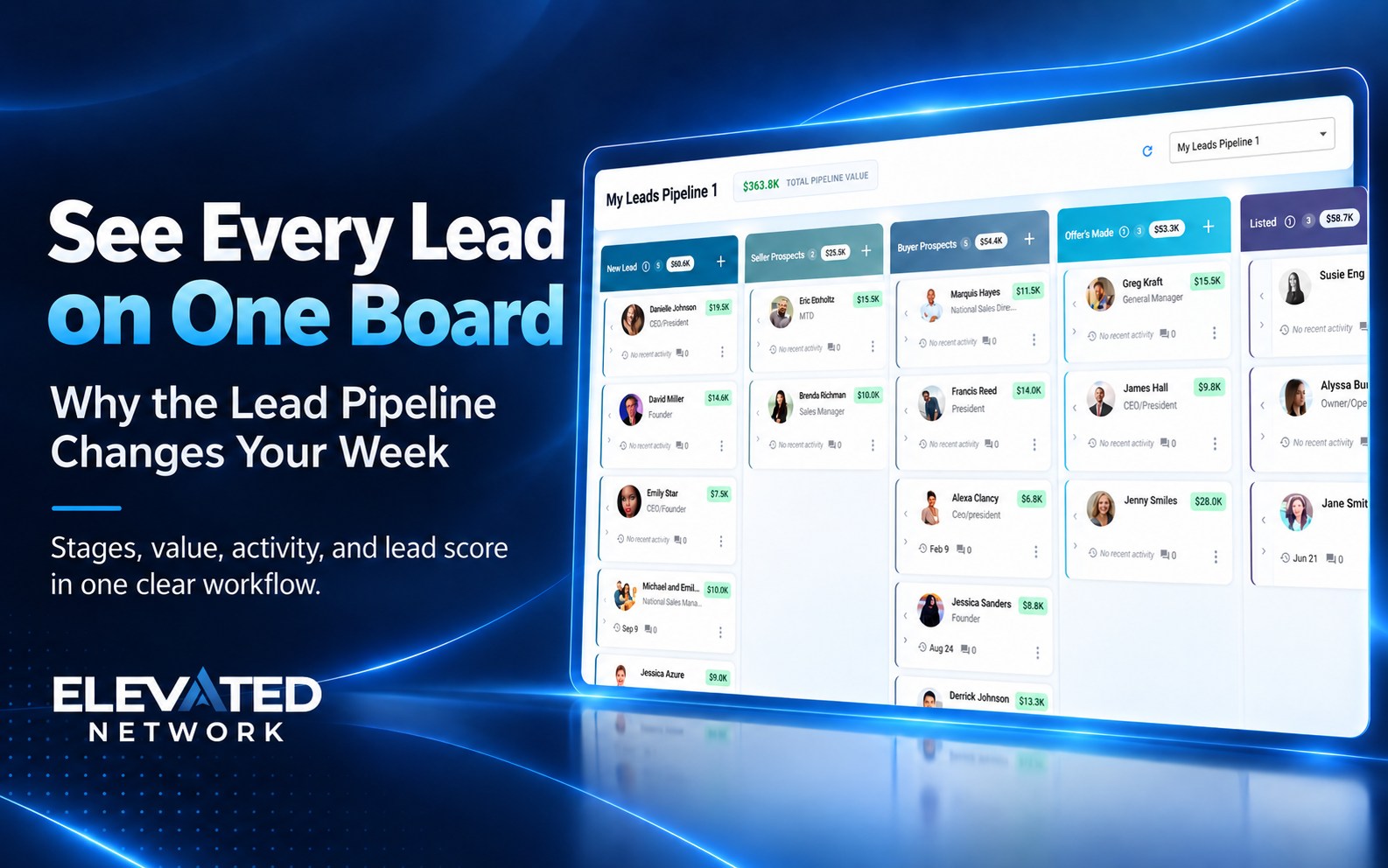
A list is everyone you know. A board is everyone you are working. Stages, names, and colors come from your account setup — New Leads, Contacted, Qualified, Closed Won is typical, not a rule. What you can edit depends on permissions.
Ask Emma can find and summarize a contact. She does not replace you moving the card when you have actually called.
What is Lead Pipeline?
Contacts → Lead Pipeline on the new platform. Kanban columns = stages. Cards = leads tied to contacts. A pipeline dropdown if you have more than one pipeline. People / All Contacts is still the full directory.
1. Pipeline vs the book
The problem: Warm past clients and hot buyers in one endless grid.
What you can do: Only people you have added as leads sit on the board. Remove From Leads is not Delete Contact.
Example: Keep the past client in the CRM. Put this week’s home-value inquiries on New Leads.
2. What a card is telling you
The problem: You need a meeting to answer “who did we ignore?”
What you can do: Photo, name, value (or “no value”), time since last activity, interaction count, lead score, and a menu to move the stage or change tags and status. Drawer: email, call, map, message. Chips often include Lead Value, Pipeline, Status, Lead Score.
Example: Open the quietest card. Send the text from the drawer.
3. Move it when reality moves
The problem: They are still in New Leads three conversations later.
What you can do: Drag the card to the next stage, or use Move to stage in its menu. Refresh if teammates moved cards. + on a stage to add existing contacts (search name, email, or tag).
Example: After the first live conversation, they leave New Leads the same day.
How it compares
| Factor | Lead Pipeline | All Contacts only | Spreadsheet |
|---|---|---|---|
| Who is an opportunity | On the board | Everyone | Highlight the row |
| Last touch | On the card | If you filter | Hope |
| Work the lead | Drawer on the board | Open the record | Leave the sheet |
We do not invent testimonials. See Member Reviews.
Make the board honest this week
- Open Lead Pipeline.
- Add the three people you owe a call.
- Move anyone further along than the column claims.
- Put a value on deals that have one.
- Work the quietest card from the drawer.
Prospects: start a trial and build a board with your kind of stages.
Common questions
Q: Does moving a card text the lead as Emma?
A: No. You (or a campaign you set up) message them.
Q: Can I have more than one pipeline?
A: Yes. Account administrators create pipelines. Use the pipeline dropdown. If a pipeline is missing, ask an admin.
Q: Is this extra?
A: CRM feature on membership ($49.99/month new-member pricing).
The bottom line
A pipeline is not decoration. It is a promise that “new” does not mean “forgotten.” You still make the call. The board should not lie about it.
Ready to put yesterday’s inquiries on a board?
Start a 14-day trial, or sign in and spend ten minutes making the columns match reality.
Start Your Free Trial → (opens in new window)
Card required to prevent spam; you will not be charged if you cancel before the trial ends. Cancel anytime in account settings.